What you will achieve
You will turn a confirmed product change into a controlled set of content updates, with a record of affected statements, destinations and owners. The process covers drafts and published versions, including copies outside AdCyte. It helps you verify what changed without assuming that one edit updates every destination automatically.
Use AdCyte to inspect the relevant video findings and written outputs. Keep the change register in your existing content tracker if necessary. Any source-change notification available in your workspace is a useful lead, but the review should still account for external copies.
Before you begin
- Obtain the approved change, its effective date and the exact product, variant and market affected.
- Identify the person authorised to resolve questions about the new fact.
- Gather the relevant campaign videos, current references, drafts and known public destinations.
- Confirm who can edit each destination and how publication approval works there.
This guide starts with a verified change to your own product information. If the issue is an unsupported statement in an external AI answer, begin with the correction-investigation guide.
1. Define the change precisely
Write the old fact, the new approved fact and the scope. “The storage range has changed” is too broad. “The small folding box now ships without the removable insert in the UK from the specified effective date” gives a reviewer something concrete to investigate.
Retain the source of the change and the approver. Distinguish a confirmed change from a suspected discrepancy or proposed future update. If the date or affected variant is unclear, resolve that before replacing public wording.
Record whether historical content needs a clarification or whether the current answer itself must change. An old campaign description may accurately describe what was advertised then, while being unsuitable as current buying guidance.
Check: a reviewer can tell which statements are affected and which remain true.
2. Find the statements and destinations that depend on it
Search your known content records for the product name, variant, old wording and relevant synonyms. Inspect AdCyte written outputs and your existing CMS or destination register. Include product-page sections, FAQs, campaign descriptions, video descriptions and any partner copy you supplied.
Do not search only for the exact sentence. “Includes an insert” and “the supplied divider” may express the same fact. Images and captions can also imply the old configuration, even when the prose has already been corrected.
Create one row per affected destination or draft. Record the URL or record reference, the statement, owner and current state. If an external version cannot be located or edited, mark the gap instead of treating the search as complete.
UK storage-box campaign
Trace the changed fact
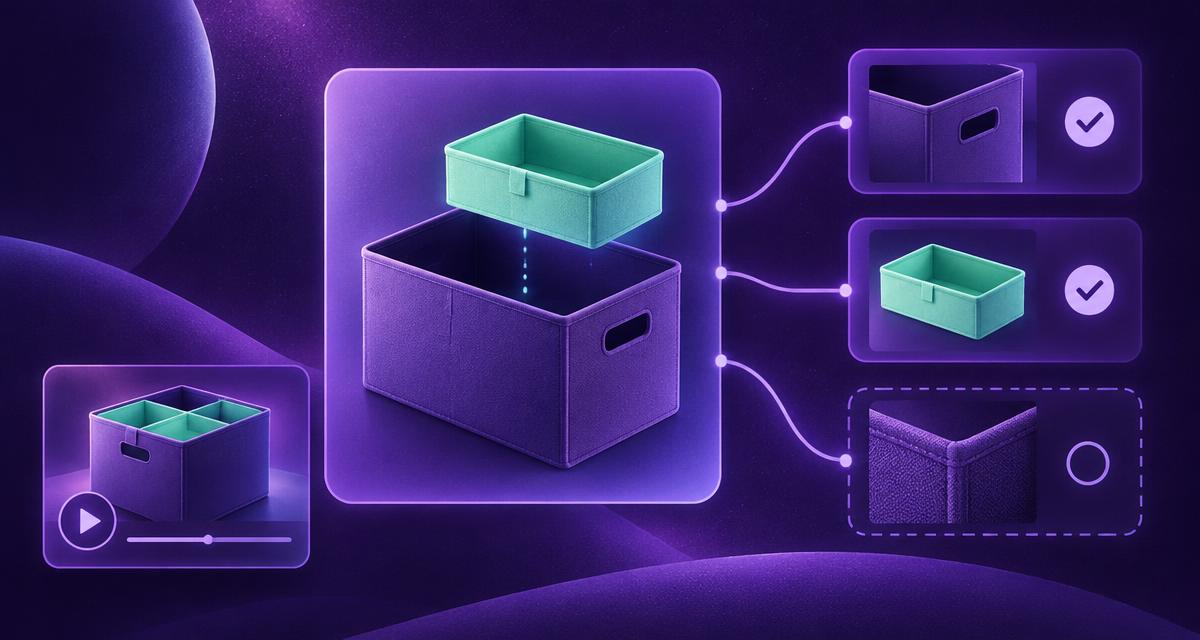
The footage describes the earlier configuration, not today’s included components.
3. Recheck the video and its relationship to the new fact
Open the relevant findings in AdCyte and inspect the supporting moments. Establish whether the footage still usefully illustrates the product, depicts the previous configuration or needs to be replaced for the intended page.
A video showing an insert remains evidence that the insert appeared in that campaign. It does not establish that the insert is included in today's product. The revised explanation may need to identify the depicted configuration and direct readers to current included-components information.
If the footage would create substantial confusion beside the current product, raise that with the campaign or website owner. A sentence in a footnote may be insufficient when the whole demonstration depends on an accessory the customer no longer receives.
Check: the proposed update reconciles the words, images and current product record.
4. Decide the right treatment for each destination
Choose whether to update the wording, add historical context, replace the supporting asset or remove an obsolete answer through the site's existing process. Preserve a useful page where it can still answer a current question accurately.
Prioritise destinations where the outdated fact could materially affect a customer's decision. A current product page usually needs attention before an archived campaign commentary, though the actual priority depends on what each page says and who uses it.
| Content state | Typical treatment | Evidence of completion |
|---|---|---|
| Unapproved draft | Correct or withdraw the affected statement | Reviewed new draft reference |
| Approved but unpublished output | Reopen the relevant review before release | Approval for the corrected version |
| Current public product answer | Update the answer and inspect the live result | Final URL and checked wording |
| Historical campaign account | Clarify the period or depicted version if needed | Accurate historical context |
| Partner-controlled copy | Supply a precise correction through the agreed contact | Confirmation or an explicit unresolved status |
The table describes decisions, not automatic AdCyte actions. Use the controls available in each system.
Illustrative change register
Track each destination separately
A correction request is not proof that the public copy changed.
5. Prepare and review the replacement wording
Update the source context used for the writing task where your workflow supports it. Prepare the replacement using the new approved fact and the reviewed video context. Keep unaffected claims intact unless they need their own correction.
For the storage box example, a current product answer could explain that the video shows the earlier configuration and direct the reader to the current components list. The exact wording depends on the authorised product record and whether the website will retain that video.
Ask the factual owner to review the changed statement and any resulting qualification. Then check the surrounding paragraph: removing one fact can leave a misleading comparison or a reference to something no longer included.
Keep the replacement text or revision identifier in the register. An approval should identify the version reviewed, rather than float above an indefinitely changing document.
6. Publish each update and verify it in place
Use the normal publishing route for each destination. Inspect the actual public page after the update, checking the body copy, FAQ, caption, image and relevant links. Where a cached or preview view differs, record the issue and follow the website's established process.
For external destinations, verify the live result where you can. If a partner has not confirmed the change, retain that open status and the responsible contact. Sending a correction request is a completed action, but it is not evidence that the public copy changed.
Do not assume search results or AI answers will immediately reflect the update. Record subsequent observations separately. Your content register should distinguish the state of your publication from the state of an external service's answer.
7. Close the change with a maintenance record
Review all rows. Close those with a checked outcome and retain an owner and next step for anything unresolved. Note whether the change exposed a missing destination register, an unclear product identity or an approval gap that should be fixed for future work.
Set the next review trigger according to the fact's likely rate of change. A temporary offer needs a different treatment from a stable explanation of how a hinge works. Use existing content operations rather than adding a calendar reminder to every sentence.
Keep the previous wording and decision history in the team's appropriate records. That makes later questions easier to resolve without leaving outdated information in public view.
Worked change record
This example shows the fields to complete, not a customer outcome.
| Field | Example |
|---|---|
| Changed fact | Included components for the small UK storage box |
| Approved source | Current product record, with owner and effective date |
| Video implication | Campaign film depicts the earlier insert configuration |
| Affected destinations | Product answer, video description, supplied retailer copy |
| Required decision | Update current answer and review whether to retain the old demonstration |
| Publication evidence | Checked URLs and revised text recorded after release |
| Open item | Retailer confirmation, if not yet received |
Troubleshooting
| Problem | Action |
|---|---|
| Nobody knows which variants changed | Resolve the product scope before editing |
| Old wording appears in many forms | Search for the underlying claim and inspect images as well as exact text |
| The video contradicts the new answer | Review asset choice and qualification together |
| A destination is outside your control | Assign an owner to request and track the correction |
| AI still repeats the old fact | Retain the sampled answer and investigate sources separately |
Completion checklist
- The change has an approved source, scope and effective date.
- Affected drafts and public destinations are recorded.
- Video, imagery and written claims have been reconciled.
- Replacement wording has the required review.
- Live updates are checked, with unresolved destinations still visible.
- Future review ownership is clear.
Next step
Use AdCyte's content workflow to review the affected video-derived material, then read How do you keep VideoGEO content accurate? for the wider maintenance approach.
FAQs
Will changing an approved fact update every published page?
Do not assume it will. Check the behaviour of your current workspace and each destination. Review affected drafts and live versions, and verify the public result after updates. External copies may require a separate manual correction.
Should we delete old campaign content when a product changes?
Decide according to the page's purpose and accuracy. Historical campaign material may remain useful with clear context, while a current buying answer needs current facts. Use the website's established process for replacing or removing obsolete content.
How do we know the update has fixed an AI answer?
You can inspect subsequent sampled answers and record what they contain. That establishes the observed response at that time, not a universal correction or proof of causation. Keep publication completion and external answer observations separate in the record.